
Deprecated: str_replace(): Passing null to parameter #3 ($subject) of type array|string is deprecated in /nas/content/live/sandbox4mt/wp-content/plugins/oms-gutenblocks/includes/oms-gutenblocks-gutenberg.php on line 489
Accessing Technical Support
All Users can directly access Mindtickle’s online knowledge base at help.mindtickle.com, including standard training materials and FAQs.
In addition, Mindtickle Users can obtain support from Mindtickle’s technical support team by the following means:
- In-platform chat (for administrative Users on the web): For immediate support around product related issues in the administrator interface on admin.mindtickle.com, administrative Users (i.e., site owners, enablement admins, group managers, content experts, IT admins) can type into the chat box at the bottom right of their desktop screen.
- In-platform support ticket submission (for end-users on the web): To report a bug or unexpected behavior of the Platform, end-users (i.e. learners, managers) can raise a support ticket by clicking the ‘Get Support’ icon at the bottom left of their Mindtickle desktop screen. When this option is used, the system automatically captures a screenshot along with relevant technical information (browser type, OS etc.) and Users can also include additional comments and description of the issue faced.
- In-app support (for mobile app Users): On Mindtickle’s native iOS and Android mobile apps, Users can click the Help and Support option in the menu to access the online knowledge base. For any additional query, Users can also click the ‘Send Feedback’ option to raise a support ticket
- Email: For specific queries or bugs that need additional description including multiple screenshots etc., Users can directly get in touch with the Technical Support team, by sending an email to support@mindtickle.com
Once contacted, a technical specialist from Mindtickle will get in touch directly with the User on their registered email address or through available contact options, within the applicable initial response time described below.
Depending on the customer’s support subscription, a User may be able to access all or some of the technical support options mentioned above. A User should contact the designated employee with Site Owner role on Mindtickle or the customer’s owner of the Mindtickle relationship in their organization to confirm the nature of support subscription available to them.
Mindtickle Support Severity Levels
All support tickets and emails sent to Mindtickle’s technical support team are categorized into priority levels, according to the guidelines listed below. Please note that the descriptions below are guidelines and may not cover every possible condition or technical situation. Mindtickle’s technical support team reserves the right to assign or re-assign the severity level for the support tickets and emails based on its reasonable judgment and guidelines below. In case the customer would like to upgrade the severity level of a particular ticket, this can be done through a discussion with the stakeholders of the customer and Mindtickle teams and their mutual agreement regarding the appropriate severity level.
Customers are responsible for providing Mindtickle technical support team with all requested business information, logs, files, as well as permitting an appropriate level of remote access to their systems instance, if needed, to resolve any reported issue. Failure to provide such information and/or access may result in extended resolution times or in Mindtickle’s inability to resolve the issue.
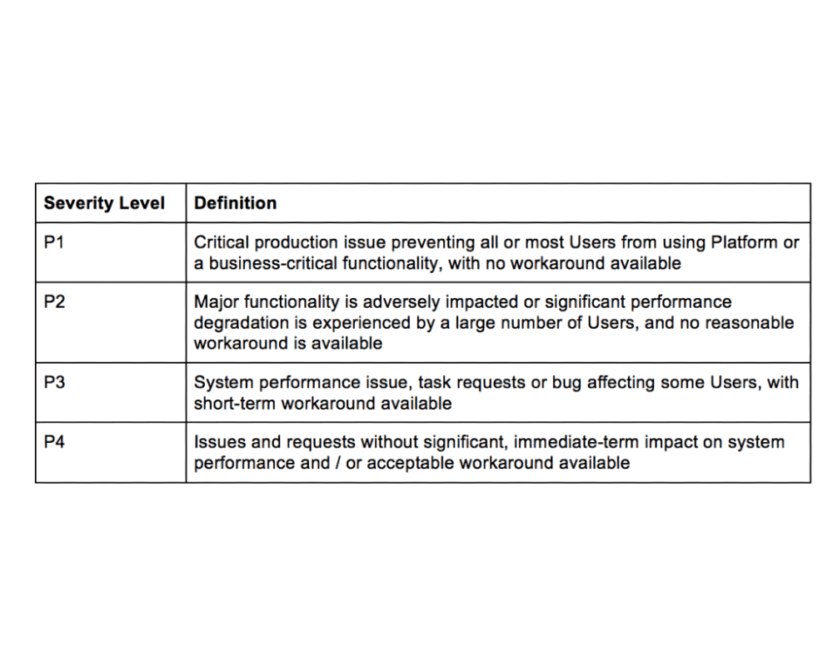
Service Level Agreement (SLA) for Mindtickle Support
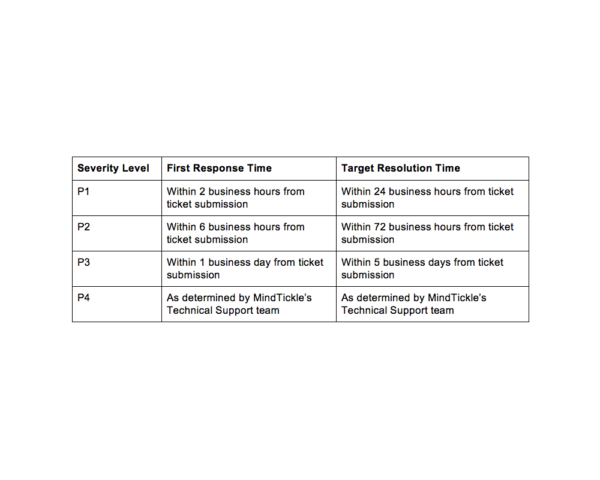
All support tickets and emails sent to the Mindtickle technical support team are prioritized as per the First Response Time and Target Resolution Time below for the assigned Severity Level.
Definitions
- First Response Time: The timeframe within which the Mindtickle technical support team will respond to a support ticket or email sent by a User (“Response Acknowledgement”). The Response Acknowledgement will typically provide an initial suggestion towards fixing the reported issue or request additional information to help diagnose the reported issue better.
- Target Resolution Time: The timeframe within which the Mindtickle technical support team estimates to provide a resolution to the reported issue. Resolution is defined as an answer, solution, completed change request, or a workaround that resolves the reported issue.
- While Mindtickle will make all commercially reasonable efforts to resolve an issue within the target resolution time, there could be exceptional circumstances (usually attributable to factors outside Mindtickle’s direct control) resulting in the resolution time extending beyond the target resolution time mentioned above. In such situations, the technical support team will inform the User about the delay and work with such User to control the impact if and as much as reasonably possible.
- Ticket submission: Ticket submission is the event when an issue is reported by a User to Mindtickle’s technical support team by means of one of the available options described above
Business Hours
Mindtickle’s standard business hours for Support Services during Daylight Standard are Sunday, 5:00 PM to Friday 5:00 PM (PST).
Mindtickle’s standard business hours for Support Services during Daylight Savings are Sunday, 6:00 PM to Friday 6:00 PM (PDT).